
Pabbly Connect Review: Effective Automations for Content Creators & Bloggers
Managing multiple social media platforms manually is exhausting. Between blogging, sharing your newsletters, and keeping your audience engaged across social media, it's overwhelming. Then, you also need to repurpose and schedule your content, so that you can milk out your content as much as possible.
Thus, Pabbly... an effective automation tool. I've been using Pabbly Connect for three years now to run automations for my projects. In this Pabbly Connect review, I’m going to share my hands-on experience and help you decide if it's the right fit for your workflow.
Let’s dive in.
[Disclosure: Bear in mind that some links in this post are affiliate links. And when you go through them and make a purchase, I will earn a commission.]
What is Pabbly Connect
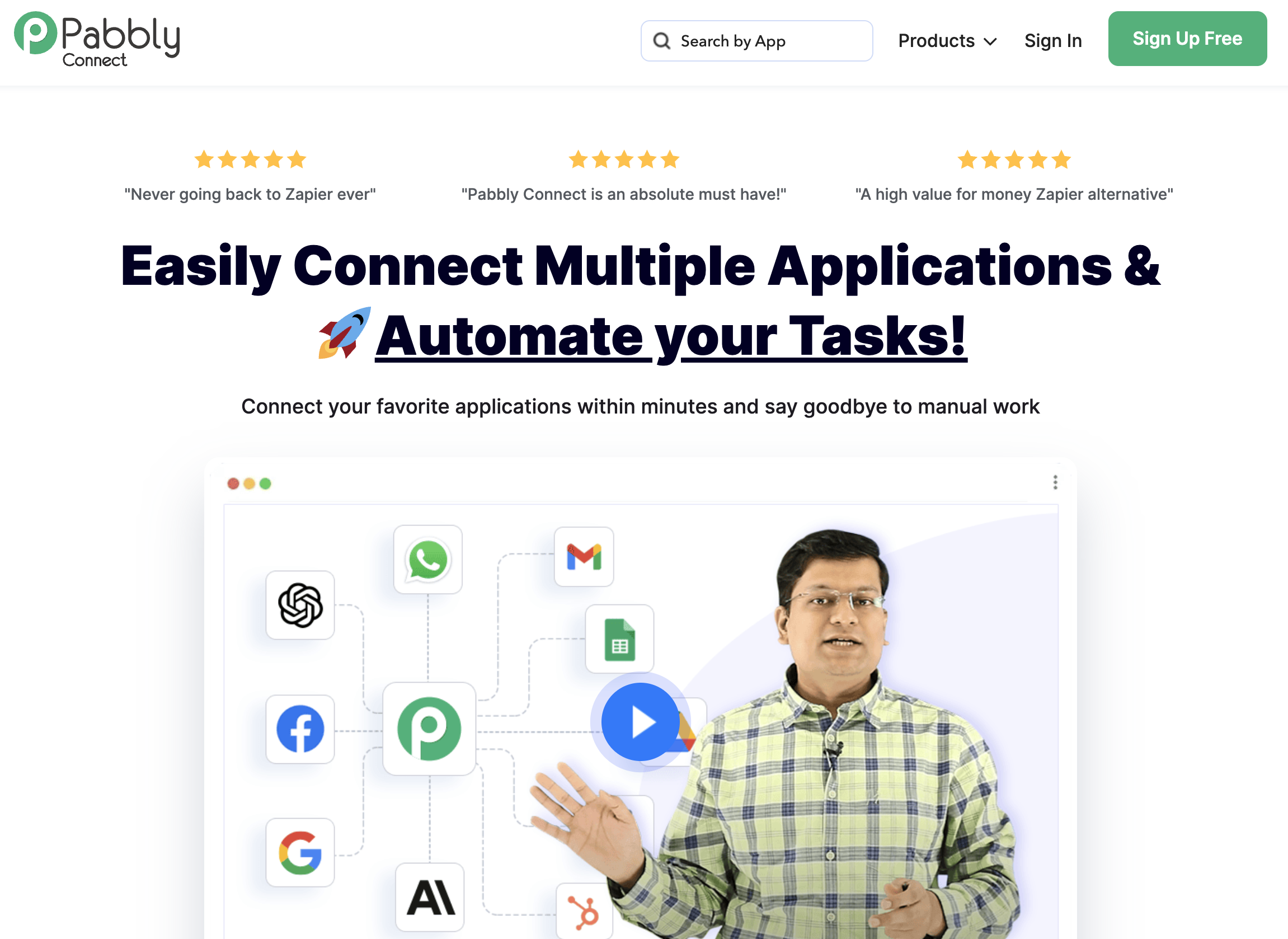
Pabbly Connect is a workflow automation tool that lets you connect different apps and automate repetitive tasks without writing a single line of code. Think of it as a behind-the-scenes assistant that moves data between your favourite tools – WordPress, LinkedIn, email marketing platforms and more – so you don't have to do it manually.
What sets Pabbly Connect apart from competitors like Zapier is its unlimited task model. While most automation platforms charge you based on how many tasks you run each month, Pabbly Connect offers internal tasks for free. This makes it incredibly cost-effective for content creators.
Pabbly Connect uses a one-time or annual pricing structure, which means you aren’t locked into expensive monthly subscriptions. Whether you're a solo blogger, a freelance content creator, or running a small business, Pabbly Connect helps you with automations without breaking the bank.
Why Pabbly Connect Stands Out
The biggest reason I chose Pabbly Connect over other automation tools is simple: unlimited automations. You can run and setup as many workflows as you want. Of course, it has task limits but no automation limits at all. For someone like me who's constantly repurposing content across multiple platforms, this is a game-changer.
Plus, Pabbly Connect was the one that offered affordable lifetime deals at that time. It’s one of the most budget-friendly automation platforms available. The annual plans are also cost-effective. It’s another thing that I usually don’t need those.
Pabbly Connect also supports multi-step workflows. You can chain together multiple actions in a single automation. For example, when I publish a new blog post, Pabbly Connect can automatically share it on social media, create repurposed posts, and design Canva graphics... all in one single workflow.
With over 2,000+ integrations, Pabbly Connect plays nicely with virtually every tool you’re using. WordPress, LinkedIn, Instagram, YouTube, Mailchimp, ConvertKit, Gumroad Shopify – you name it, Pabbly Connect probably connects to it.
And you don’t need any code for its native integrations. Pabbly Connect's visual workflow builder lets you add, connect and configure new automations using a simple interface. If you’re good at following steps, you can build a Pabbly workflow.
Also Read: SuiteDash Lifetime Deal for All-in-One Client Management
What Can Pabbly Do
Well, it can save hours of manual work every week. For example, I have an automation set up so that every time I publish a new article on Book Blabber, Pabbly automatically shares the link on all my connected social media platforms. It does the same for my newsletters. No need to remember to post manually or schedule content separately.
I've also set up workflows that take existing blog content and reformat it for different platforms. For instance, pulling key quotes from a review and turning them into Instagram-ready graphics or paraphrasing the content for LinkedIn, Reddit and Threads. It's content repurposing on autopilot. It helps keeps my social media presence active without adding extra work to my plate.
Get started with Pabbly Connect
Pabbly also syncs my customer details for digital products on Gumroad (it did so also when I was running my merch store on Shopify. Although I didn’t use the data anywhere, I guess it’s still lying somewhere in Google Sheets. At least, I won’t lose my data any time soon.
Beyond my personal use cases, Pabbly Connect can handle a ton of other automations that content creators and bloggers will love:
- Automatically add new YouTube subscribers to your email list
- Send welcome emails when someone downloads your lead magnet
- Post new podcast episodes to Twitter, Facebook and LinkedIn simultaneously
- Track affiliate sales by sending order notifications to Slack or email
- Create tasks in project management tools like Trello or Asana when you receive new client enquiries
- Sync contacts between your CRM and email marketing platform
- Generate weekly reports by pulling analytics data from Google Analytics, YouTube and social media into a Google Sheet
The possibilities are pretty much endless. If you're doing something repetitive online, there's a good chance Pabbly Connect can automate it.
Also Read: Carrd One-Page Website Builder Review
What are Pabbly Connect's Key Features
Pabbly Connect supports over 2,000 apps, including almost all the tools you're probably using. That’s what makes it so powerful for content creators and bloggers.
- Multi-step workflows: It cab create complex, multi-step workflows for the integrations you need. Sophisticated sequences that involve multiple triggers, actions, filters and conditions. You aren’t limited to just simple "if this, then that" automations.
See all Pabbly Connect integrations
- Internal tasks: Pabbly Connect also includes internal apps like formatters and webhooks, which give you even more flexibility. You can store data temporarily, create custom API connections and build flows that go beyond what standard integrations offer. This is especially useful if you're working with niche tools or custom-built platforms.
- Task scheduling and retries: Pabbly Connect lets you add scheduling and delays to your workflows. And if your automations fail, Pabbly Connect includes built-in error handling and retry logic. So if something goes wrong, the system automatically tries again. You'll also get notifications when errors occur, so you can troubleshoot quickly.
How Much Does Pabbly Cost
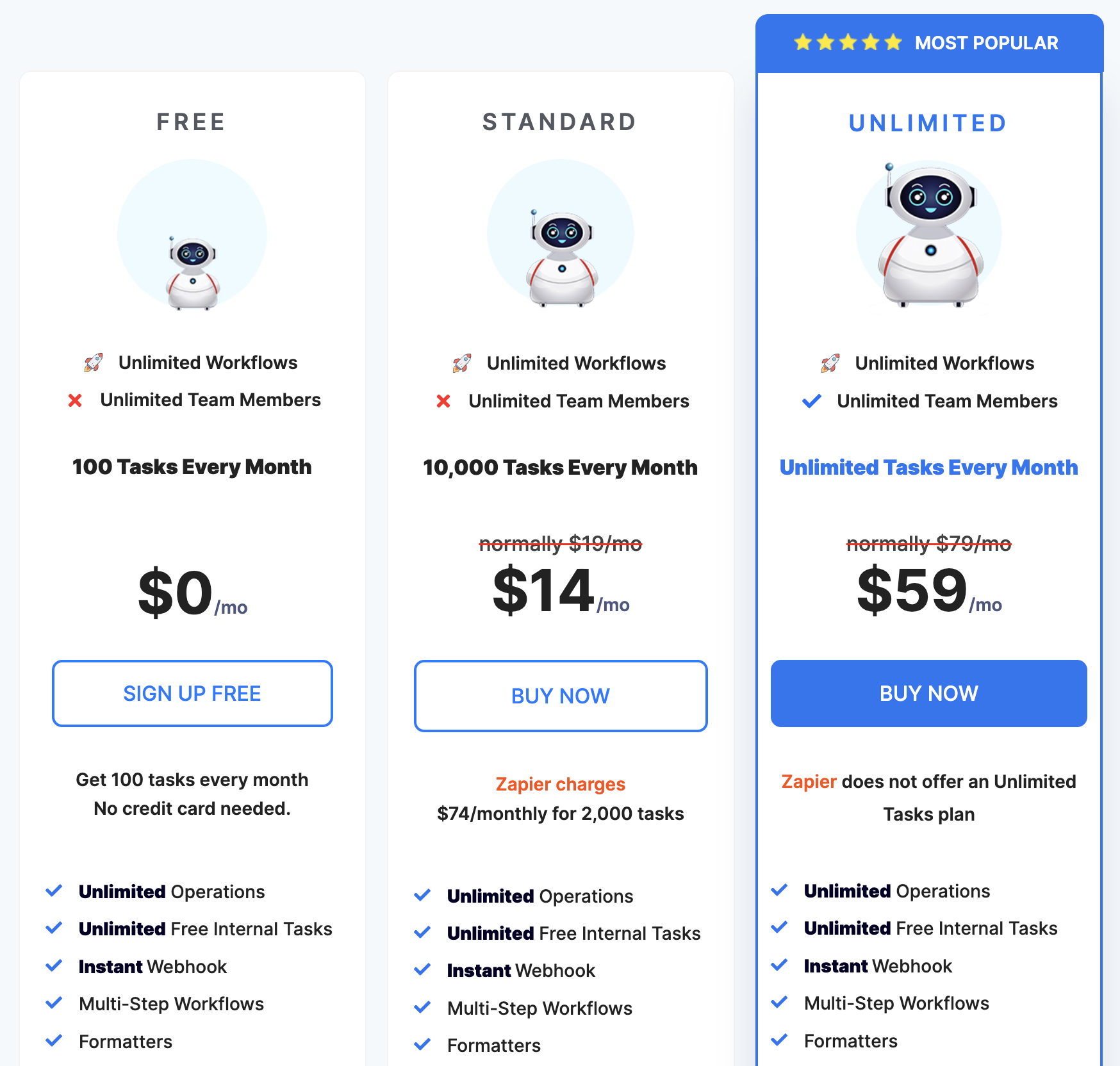
Pabbly Connect offers several affordable paid plans, making it accessible for bloggers and creators at any stage. Whether you want to pay annually or invest in a one-time lifetime deal, there's a plan that works for you.
Annual Plans
Pabbly Connect's annual plans start at around $19/month when billed yearly. The key benefit here is availability of 10,000 automated tasks. Higher-tier annual plans offer unlimited tasks, additional team members, and premium integrations. For bloggers and content creators who consistently publish and distribute content, the annual plans provide excellent value.
Check Pabbly Connect annual plans
Lifetime Plans
This is where Pabbly Connect really stands out. Pabbly occasionally offers lifetime deals where you pay once and own the plan forever. No recurring fees, no surprise price hikes. If you can snag a lifetime deal, you have an one-time investment for running multiple automations daily. It's a massive cost saver for long-term users who want to lock in their automation setup without ongoing subscription expenses.
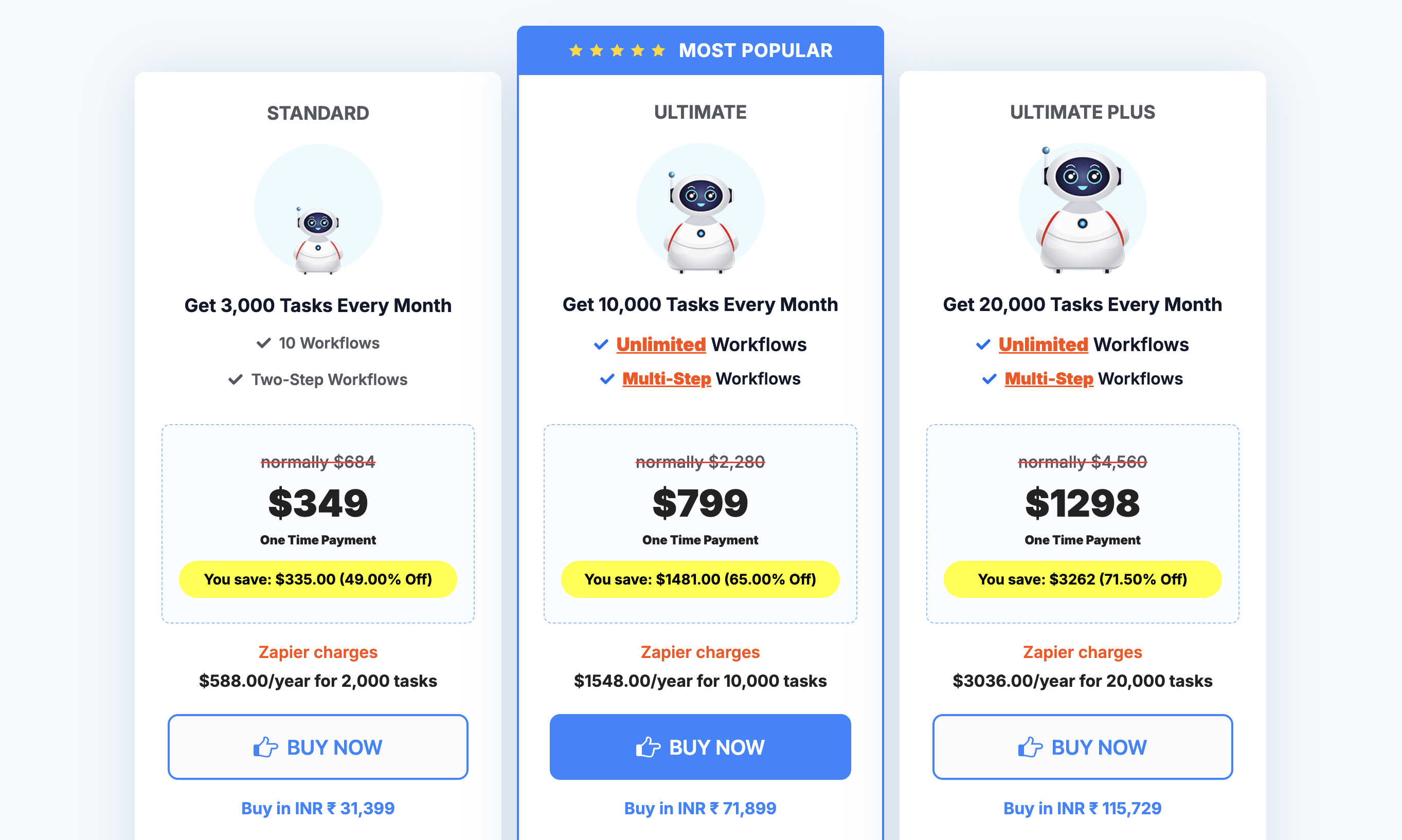
For content creators who are constantly publishing, repurposing and distributing content across multiple platforms, the time savings alone justify the cost of a lifetime plan. Even the basic plan costs less than hiring a virtual assistant. Plus, Pabbly works 24/7 without complaining.
Pabbly Connect does offer a free plan as well, with 100 tasks per month. It's a decent way to test the platform and see if it fits your needs. But if you're serious about automation, you'll quickly outgrow it. Think of the free plan as a trial run.
How Good is Pabbly Connect
Pabbly is incredibly powerful, but that’s also the issue. Pabbly dashboard prioritises functionality over design, which means there's a steeper learning curve than some competitors. The interface isn't the most intuitive, and it might feel a bit clunky at first.
That said, once you understand how the system works, it becomes second nature. Pabbly Connect offers plenty of video tutorials and written guides to help you get up to speed. The effort you put into learning the platform absolutely pays off in the long run.
Access Pabbly Connect video tutorials
Another these worth mentioning is that Pabbly Connect doesn't have a mobile app. If you need to monitor or adjust workflows on the go, you'll have to use the web version on your web browser... which, of course, isn't the most elegant experience.
Despite these limitations, I've found Pabbly to be incredibly reliable. Automations run smoothly, integrations work as expected, and the unlimited task model means I don’t have to worry about usage caps. For the price point and functionality, it's hard to beat.
Wrapping It Up: Is Pabbly Connect A Good Automation Software
If you're a content creator, blogger, or small business owner who's tired of manually posting to social media and juggling multiple platforms, Pabbly Connect is absolutely worth considering. The unlimited automation workflow executions make it a standout choice, especially if you need to run multiple automations for your work.
Yes, there's a learning curve. Yes, the interface could be prettier. But the value you get – both in time saved and money saved – is undeniable. I've been using Pabbly Connect for over two years now and it's become an essential part of my content workflow.
If you're ready to reclaim hours of your week, give Pabbly Connect a try. You won't regret it.
[Disclosure: Bear in mind that some links in this post are affiliate links. And when you go through them and make a purchase, I will earn a commission.]