
UserWay Accessibility Widget - No-Code Way to Making Your Website Accessible
For a business to succeed, you need to connect with the people. And a big part of that connection comes from embracing accessibility and inclusion. When you make your website accessible to all, you not only expand your market but also improve your customer relationships. It enhances overall user experience and builds stronger loyalty.
In this article, we're going to read about UserWay, a no-code web accessibility widget designed to make your website accessible to everyone. If you want to build a website that includes people from all walks of life, you must check this UserWay review.
Let’s dive in.
[Disclosure: Bear in mind that some links in this post are affiliate links. And when you go through them and make a purchase, I will earn a commission.]
Why website accessibility matters for business
People want to feel seen, understood and valued by the brands they support. When your brand reflects the diverse world we live in, it creates a greater sense of connection to your brand. By integrating accessibility into your website, you're making it easy to navigate. Add to that warm and welcoming content, and users are more likely to engage.
Think of website accessibility as creating an environment where everyone feels comfortable. When you make websites accessible to people with disabilities – through readable fonts, clear navigation, image alt text, and other features – you improve the experience for everyone.
UserWay website accessibility widget offers several options, such as changing font size or improving contrast, that make the site easier to navigate. This attention to detail makes a big difference in boosting customer satisfaction and improving conversions.
What is UserWay accessibility widget
UserWay is a popular AI-powered solution that enhances the design and functionality of websites. The UserWay widget is a no-code tool that integrates into virtually any website to improve its accessibility for visitors with disabilities. Whether you're running a WordPress blog, a Shopify store, or a custom web application, UserWay's widget can probably be installed.
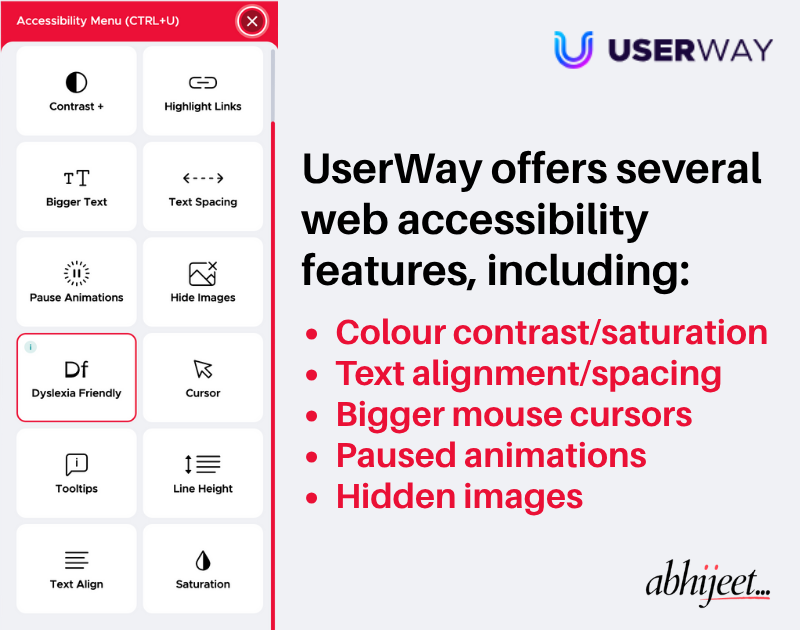
This accessibility widget appears as a floating button on the website, allowing users to customise their experience based on their individual needs. From adjusting text size and contrast to enabling screen readers, UserWay provides a range of features to make your website more inclusive.
What sets UserWay apart is its AI-powered approach. It automatically identifies web accessibility issues per W3C WCAG (Web Content Accessibility Guidelines), adding alternative text and noting remediations for the admin or developer to review and update.
Sign up for UserWay free trial
How UserWay improves user experience
UserWay significantly enhances user experience by offering a lightweight, AI-powered accessibility widget. This free UserWay plugin integrates with websites, offering basic accessibility features that viewers can activate while browsing.
With the Free plan, UserWay implements essential digital accessibility standards. Some of those accessibility features include:
- Adjusting colour contrast and saturation for better visibility.
- Making clickable links and mouse cursor more visible.
- Changing font size and text alignment for easier reading.
- Adjusting spacing between letters, words and lines of text.
- Pausing moving content and animations that can be distracting.
I tested UserWay across multiple platforms – WordPress, Carrd and Publii. The implementation of accessible design for users with disabilities was smooth with the UserWay WordPress plugin. For my Carrd and Publii sites, I had to use the custom embed code. The floating UserWay accessibility widget showed up instantly as soon as the code went live on the sites.
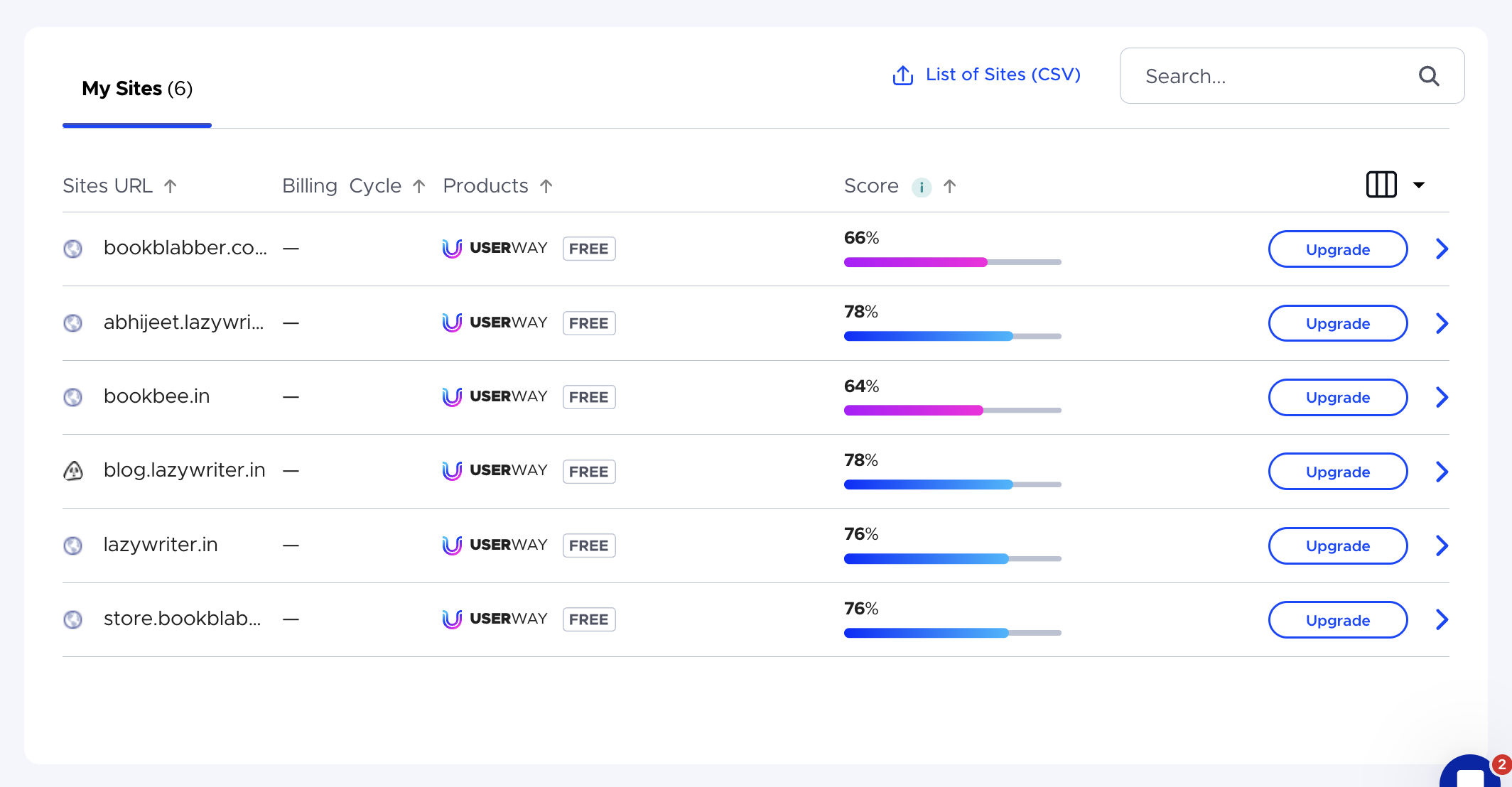
On the backend, the UserWay dashboard provided accessibility ratings for each of those sites. It also provided a quick overview of all the WCAG violations and accessibility issues that I needed to address for compliance.
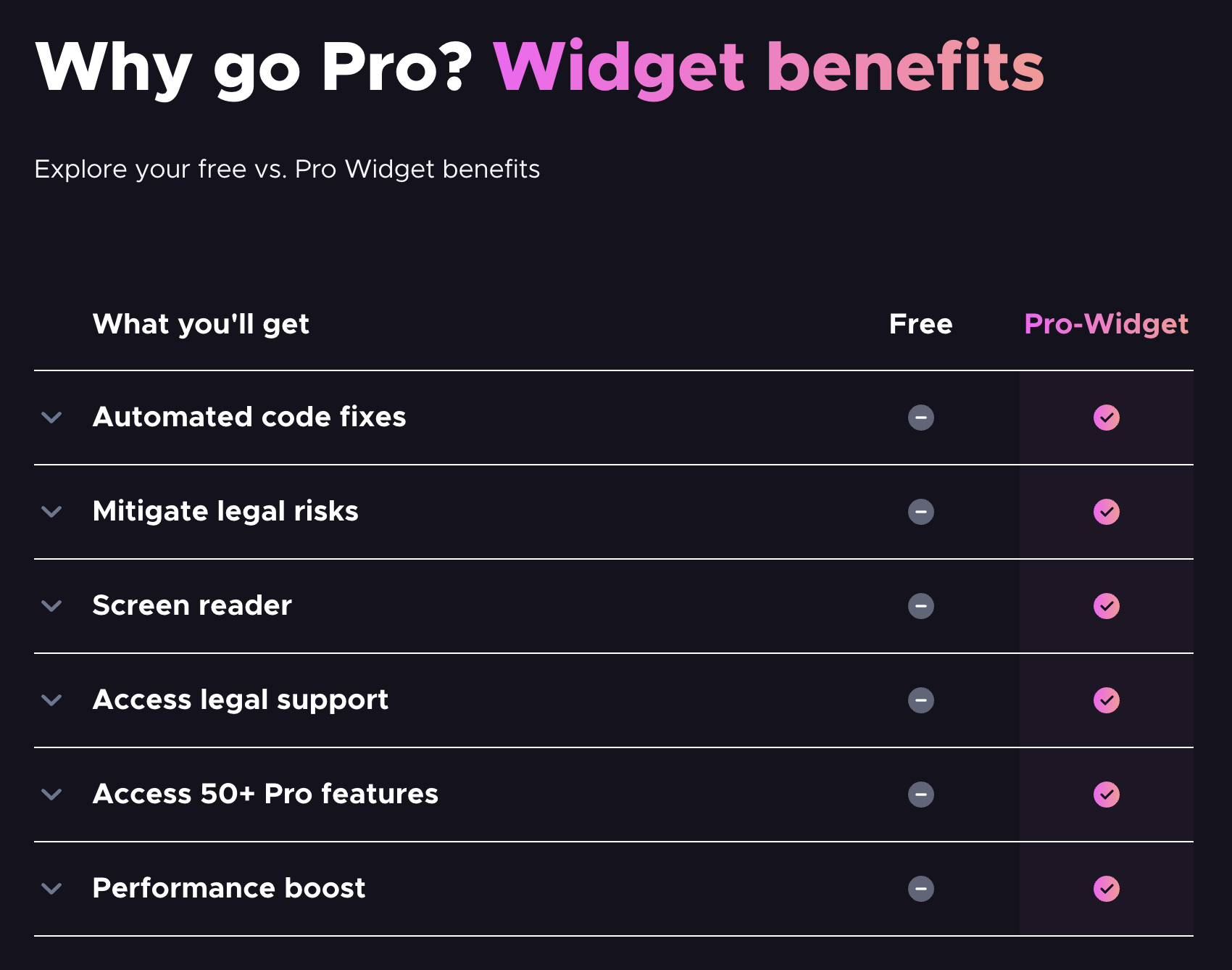
While this free UserWay accessibility plugin makes a website accessible to some extent, it doesn’t offer automated remediation. For example, it doesn't have the AI-based screen reader feature. It also misses the automatic alt tag generation for media files, which allows screen readers to identify them.
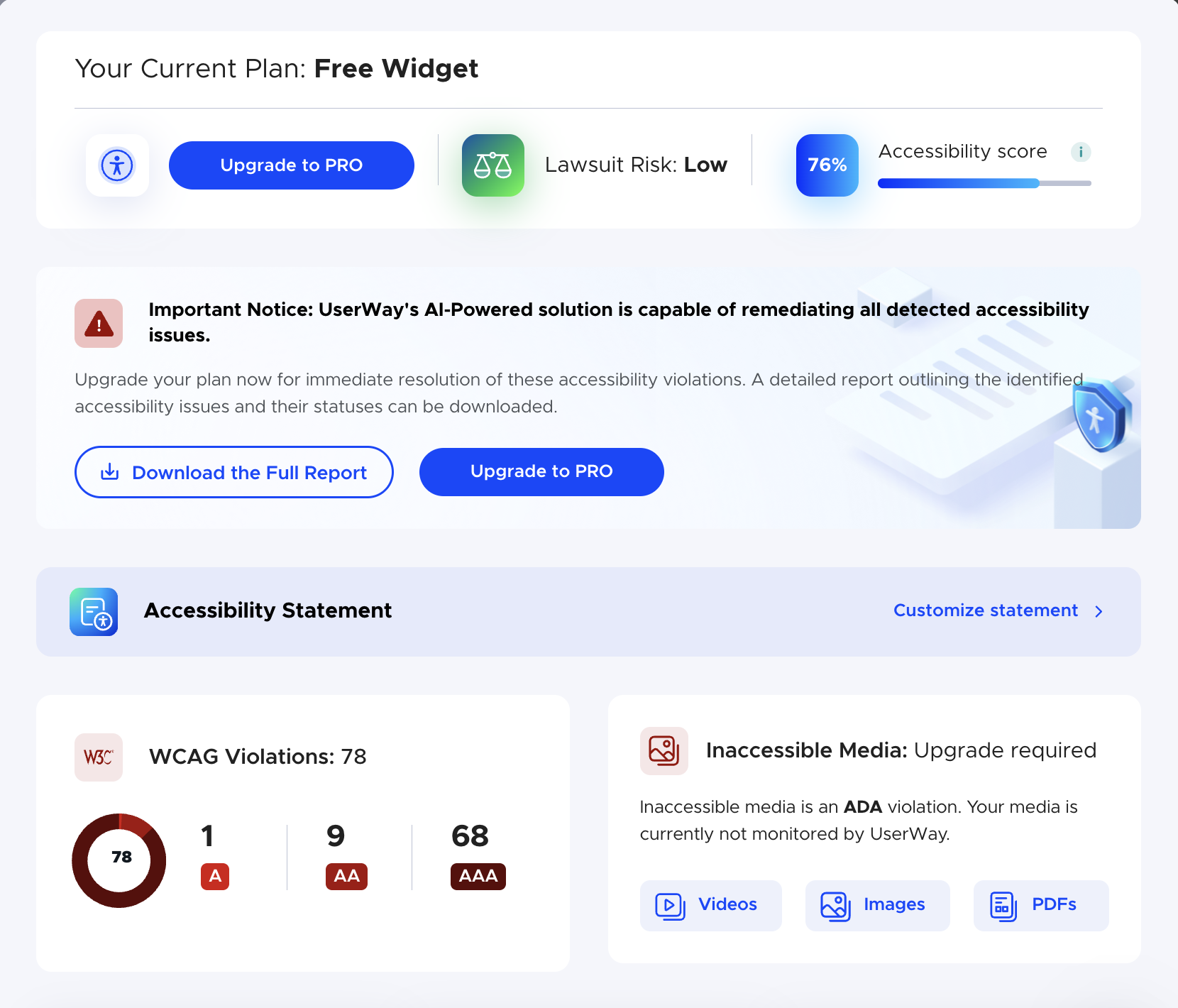
UserWay Pro offers a comprehensive suite of accessibility and compliance tools. Once activated, it automatically suggests remediations for accessibility issues, making your websites more inclusive for users with disabilities. It ensures compliance with the latest regulations in the US, Canada and Europe, plus the global standards as set by WCAG.
Get UserWay trial and create disability accessible websites
How UserWay Pro ensures accessibility & compliance
UserWay Pro is more than an accessibility widget overlay. It’s designed to improve your website’s inclusivity while enhancing performance and user trust. It’s an effective way for your business to meet the highest standards of digital accessibility.
This AI-powered accessibility by UserWay lets you design beautiful, accessible websites for various disability profiles. UserWay AI can make websites more accessible to visitors with motor impairments, blindness, colour blindness, cognitive/learning disabilities, and many other disabilities.
Advanced Assistive Technology
UserWay Pro includes additional tools that go beyond basic usability and accessible web design offered by the free plan. These features make your site more inclusive and intuitive for all visitors.
- Built-in screen reader reads webpage content aloud without requiring external software.
- Voice Navigation enables users to interact with websites using voice commands.
- Specialised dyslexia-friendly fonts enhance readability for users with dyslexia and others.
Full WCAG 2.1 & 2.2 Compliance
It also supports over 40 accessibility criteria across A, AA and AAA levels. It caters to additional needs, such as captions, audio descriptions and smart contrast, ensuring your site meets the W3C Web Content Accessibility Guidelines and other global accessibility standards.
- Audio descriptions and media alternatives.
- Live/prerecorded captions and AI translations.
- Smart contrast and enhanced visual presentation.
- Text spacing, reflow and orientation adjustments.
- Support for sign language and keyboard navigation.
UserWay also offers plan to scan & monitor digital accessibility-related issues in real time. An audit plan, too, is available for developers to address accessibility issues in the code.
Check all UserWay pricing plans
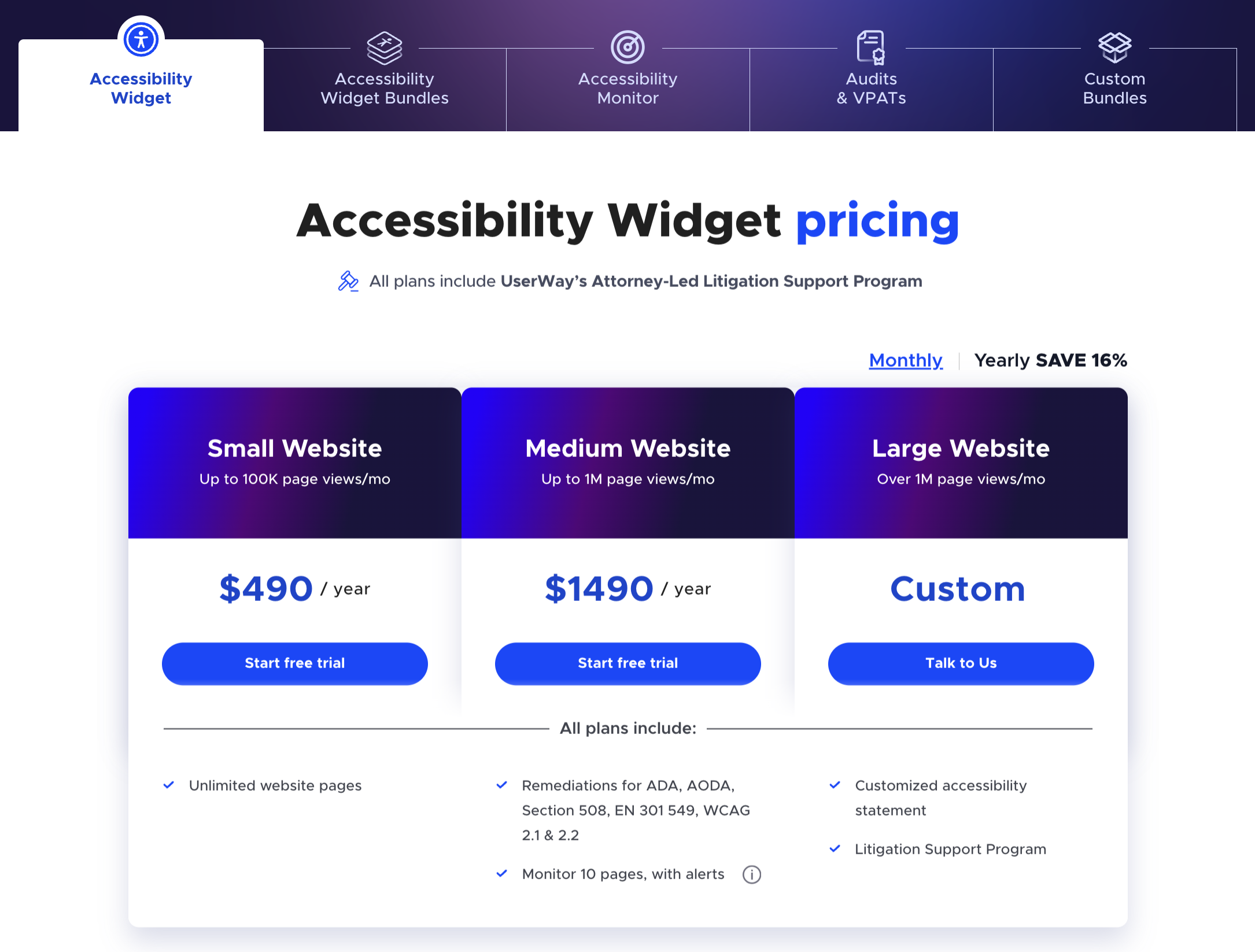
Legal Protection & Risk Mitigation
The Pro UserWay accessibility widget includes attorney-led litigation support and automated code remediations. This proactive compliance reduces legal liability, strengthens your defence against lawsuits, and aligns your site with ADA, Section 508, and international regulations.
- Mitigated liability by demonstrating proactive website WCAG compliance.
- Attorney-led litigation support to navigate legal challenges and audits.
- Automated code fixes without having to comb through accessibility issues.
Seamless Integration & Scalability
UserWay Pro upgrades instantly with no code changes required. Using just a plugin, it improves WordPress website accessibility, Shopify website accessibility, Wix website accessibility, and many others. Whether you're a developer, content manager or business owner, Pro adapts to your site and grows with your needs.
- One-click activation enhances your existing setup to accessible website design.
- All automated remediations happen in-browser without requiring code changes.
- Suitable for all types of businesses, including enterprises with several websites.
Performance-Driven Results
With comprehensive webpage accessibility, sites using UserWay Pro report better performance. By improving usability and trust, Pro helps convert more visitors into loyal users and customers.
- +1.0% increase in click-through rates.
- -0.5% reduction in bounce rates.
- +2.4% increase in earnings per click.
- +3.5% increase in earnings per visitor.
Compare UserWay accessibility in Free vs Pro
Why choose UserWay Pro for website accessibility
UserWay Pro transforms accessibility from just a checkbox into a competitive advantage. If you value compliance, inclusivity and performance, it’s a must-have for disability-friendly websites. This inclusive web design tool, essentially, future-proofs your digital presence while delivering a better experience for every user.
Here's what UserWay accessibility widget means for your business:
- Risk protection that pays for itself: With accessibility lawsuits on the rise, the attorney-led litigation support alone can save you tens of thousands in legal fees. With UserWay, you aren’t buying just an accessibility software... you’re buying peace of mind and expert backup if issues arise.
- Improved return on investment: The performance metrics of UserWay aren't hypothetical. Real accessible sites see measurable improvements in click-through rates and earnings per visitor. When more people can use your website comfortably, of course, more people convert into customers.
- Stay compliant with confidence: Websites with UserWay Pro are constantly monitored, helping you stay aligned with the latest WCAG guidelines. UserWay org AI ensures that site admins and developers know what to refine and readjust as the guidelines update. The tool eases up the need for constant manual upkeep.
Disclaimer:
While UserWay Pro offers automatic updates and monitoring, it doesn’t guarantee full accessibility compliance. True compliance goes beyond what a website widget alone can achieve. For a site to be fully accessible, developers need to build an appropriate underlying structure. The UserWay team also recommends having an admin review any edits made by the widget.
Businesses on custom or large-site plans can consult UserWay’s legal support team for guidance. The team helps ensure your accessibility strategy meets the highest possible standards.
What websites does UserWay support
One of UserWay's greatest strengths is its versatility. The widget integrates seamlessly with a wide range of platforms, improving the usability and accessibility of websites. UserWay.org pricing plans also make it useful for businesses of all sizes and technical capabilities.
Currently, the UserWay accessibility widget has built-in plugins for WordPress, Wix, Joomla and a few other content management systems. It also supports integration with eCommerce platforms, such as Shopify, BigCommerce and PrestaShop. HTML/CSS sites and development frameworks like React and AngularJS apps are also supported via code embeds.
During my UserWay review, I personally checked the code embedding method on my Publii sites and Carrd landing pages. And it worked flawlessly. No hassle; no troubleshooting required. You just have to know how to place the code in your site's <head> tag. That’s it!
Check all UserWay plugin integration tutorials
Wrapping It Up: UserWay Accessibility Widget Review
After testing UserWay across multiple platforms, I can confidently say it delivers. Its free plan offers a few essential features as per the WCAG web accessibility guidelines, and UserWay Pro delivers comprehensive WCAG compliance. It’s best to keep in mind, though, that to be fully accessible and compliant, you need to regularly review and refine code changes.
UserWay offers a practical solution for businesses that want to ensure website accessibility for people with disabilities. Using an AI-powered accessibility tool like UserWay streamlines the process and provides a smooth transition. The installation is genuinely hassle-free.
Ready to get started? Do a free site accessibility test to identify accessibility issues (if any). The future of the web is inclusive. UserWay makes it easier to be part of that future.